
Understanding Graphics, Vectors, and Rasters
Understanding Graphics, Vectors, and Rasters
Welcome to your first lecture on Multimedia Applications!
Introduction to Graphics
Graphics are visual designs or pictures created using computers to present information in an attractive and easily digestible manner1. Their primary purpose is to simplify complex information, allowing users to grasp concepts quickly through visual representation rather than reading lengthy text.
Common Types of Graphics
Graphics are used across various fields to enhance communication:
Charts & Diagrams: Visual data representations like bar charts for student marks or pie charts for survey results.
Logos & Symbols: Distinctive designs used by brands and organizations to communicate identity instantly.
Digital Images: Illustrations and artwork found in books, apps, and social media.
Technical Drawings: Detailed schematics, such as architectural plans or network layouts.
Vector Graphics
Vector graphics are created using mathematical formulas that define lines, curves, and geometric shapes.
Key Characteristics
Infinite Scalability: They can be enlarged or reduced to any size—from a mobile screen to a massive billboard—without losing sharpness or quality.
Precision: They maintain crisp edges and smooth curves, making them ideal for professional design work.
Smaller File Size: These files are generally smaller than raster files.
Common Uses and Formats
Examples: Company logos (e.g., Google, Nike), mobile app icons, road signs, and typography.
File Formats: .SVG, .AI, .EPS, and .PDF.
Raster Graphics
Raster graphics (also known as bitmap images) are composed of thousands or millions of tiny colored squares called pixels.
Key Characteristics
Resolution Dependent: Quality is determined by the pixel count; more pixels result in a sharper image.
Size Limitations: If a raster image is enlarged beyond its original size, it becomes blurry or \\\\\\\\\\\\\\\\\\\\\\\\\\\\\\\"pixelated\\\\\\\\\\\\\\\\\\\\\\\\\\\\\\\".
Photorealistic Detail: This format is perfect for capturing complex colors, shadows, and realistic textures.
Common Uses and Formats
Examples: Digital photographs from cameras/smartphones, images on websites, and scanned documents.
File Formats: .JPG, .PNG, .BMP, .GIF, and .TIFF.
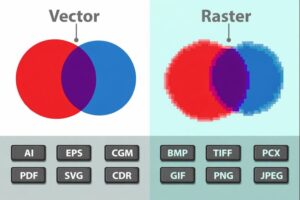
Quick Comparison Summary
| Feature | Vector Graphics | Raster Graphics |
| Made From | Mathematical lines & shape
| Tiny colored pixels
|
| When Resized | Stays sharp and clear
| Becomes blurry/pixelated
|
| Best For | Logos, icons, diagrams
| Photos, realistic images
|
| File Size | Usually smaller
| Usually larger
|
| Common Formats | SVG, AI, EPS
| JPG, PNG, GIF
|
Conclusion
Choosing the right format depends on the project goals. Use Vector for designs that require flexibility and frequent resizing, such as logos. Use Raster for projects requiring high levels of realism and complex color detail, such as photography